External API Documentation
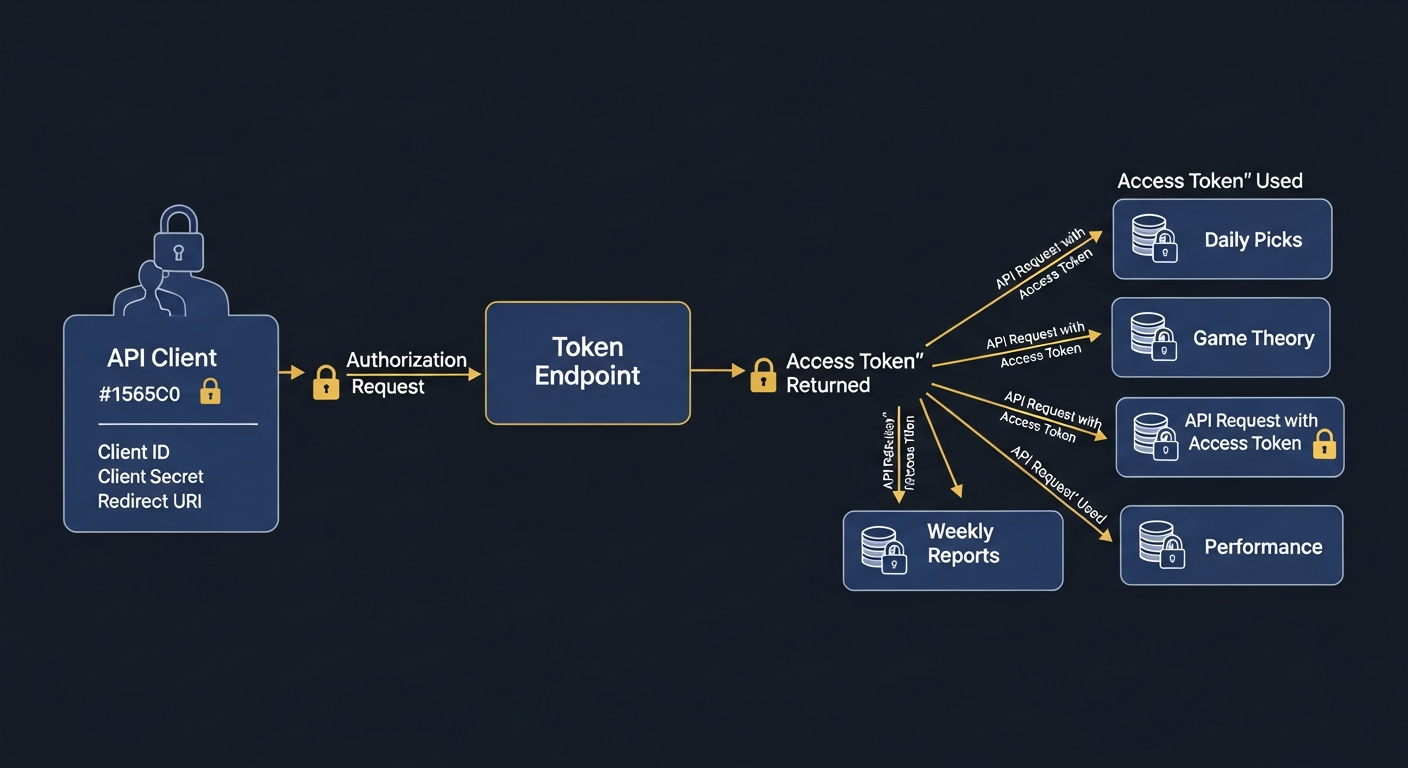
Access ManiBot's AI-powered stock analysis, daily picks, game theory breakout analysis, and performance data through our REST API. Perfect for automation tools like n8n, Zapier, or custom integrations.
Step 1: Get API Keys
Create API credentials in the API Keys section.
Step 2: Get Access Token
Exchange your client credentials for an access token.
Step 3: Call Endpoints
Use the Bearer token to access any data endpoint.
API Flow Overview
AI Stock Picks
Breakout Analysis
Performance Reports
Trade Records
Daily Pick Images
Rate Limiting
API requests are limited to 100 requests per minute per client. Access tokens expire after 1 hour. Request a new token when expired.
Authentication
Request Body
{
  "grant_type": "client_credentials",
  "client_id": "mbc_your_client_id",
  "client_secret": "mbs_your_client_secret"
}
Response
{
  "access_token": "mbt_eyJhbGciOiJIUzI1NiIsInR5cCI6IkpXVCJ9...",
  "token_type": "Bearer",
  "expires_in": 3600
}
Stock Picks Endpoints
| Parameter | Type | Description |
|---|---|---|
| date | string | Filter by date (YYYY-MM-DD) |
| limit | integer | Max results (default: 10, max: 100) |
Example Request
curl -X GET "https://your-app.replit.dev/api/external/v1/daily-picks?date=2026-01-03&limit=5" \
  -H "Authorization: Bearer mbt_your_access_token"
Response
{
  "success": true,
  "data": [
    {
      "ticker": "AAPL",
      "company_name": "Apple Inc.",
      "pick_date": "2026-01-03",
      "signal_type": "BUY",
      "confidence_score": 85,
      "current_price": 185.50,
      "predicted_entry_price": 184.00,
      "predicted_exit_price": 195.00,
      "stop_loss_price": 180.00,
      "buy_signals_count": 5,
      "strategies": ["Momentum Breakout", "RSI Divergence"],
      "created_at": "2026-01-03T08:00:00Z"
    }
  ],
  "count": 1
}
| Parameter | Type | Description |
|---|---|---|
| date | string | Filter by run date (YYYY-MM-DD) |
| limit | integer | Max results (default: 10, max: 100) |
Response
{
  "success": true,
  "data": [
    {
      "ticker": "NVDA",
      "run_date": "2026-01-03",
      "rank": 1,
      "overall_score": 92.5,
      "strategic_state": "BREAKOUT",
      "price_at_pick": 485.00,
      "institutional_score": 88,
      "retail_score": 75,
      "market_maker_score": 90,
      "short_seller_score": 65,
      "algo_score": 85,
      "insider_score": 78,
      "narrative": "Strong institutional accumulation with algorithmic support...",
      "created_at": "2026-01-03T09:30:00Z"
    }
  ],
  "count": 1
}
Performance Endpoints
| Parameter | Type | Description |
|---|---|---|
| limit | integer | Number of weeks (default: 12, max: 52) |
Response
{
  "success": true,
  "data": [
    {
      "week_start": "2025-12-30",
      "week_end": "2026-01-03",
      "total_trades": 25,
      "wins": 18,
      "losses": 5,
      "breakeven": 2,
      "win_rate": 72.0,
      "total_pnl": 1250.50,
      "avg_pct_gain": 3.25
    }
  ],
  "count": 1
}
| Parameter | Type | Description |
|---|---|---|
| status | string | pending, open, closed, cancelled |
| sourceType | string | daily_pick or game_theory |
| startDate | string | Start date filter (YYYY-MM-DD) |
| endDate | string | End date filter (YYYY-MM-DD) |
| limit | integer | Max records (default: 50, max: 500) |
Response
{
  "success": true,
  "data": [
    {
      "id": 1,
      "ticker": "MSFT",
      "source_type": "daily_pick",
      "pick_date": "2026-01-02",
      "status": "closed",
      "actual_entry_price": 375.50,
      "actual_exit_price": 385.00,
      "pnl_amount": 9.50,
      "pnl_percent": 2.53,
      "outcome": "win",
      "trade_duration_minutes": 1440
    }
  ],
  "stats": {
    "totalTrades": 100,
    "wins": 68,
    "losses": 27,
    "breakeven": 5,
    "winRate": "68.00",
    "avgPctGain": 2.15,
    "totalPnl": 4250.75
  },
  "count": 1
}
Infographics Endpoints
Returns the URL path to today's latest generated infographic image.
Example Request
curl -X GET "https://your-app.replit.dev/api/daily-picks/latest-infographic" \
  -H "Authorization: Bearer mbt_your_access_token"
Response
{
  "success": true,
  "infographicUrl": "/uploads/infographics/daily-picks-full-2026-01-10.png",
  "date": "2026-01-10"
}
| Parameter | Type | Description |
|---|---|---|
| :date | string | Date in YYYY-MM-DD format |
| type | string | summary (default) or full |
Example Request
curl -X GET "https://your-app.replit.dev/api/daily-picks/infographic/2026-01-10?type=full" \
  -H "Authorization: Bearer mbt_your_access_token" \
  --output daily-picks.png
Response
Returns PNG image binary data (Content-Type: image/png)
| Parameter | Type | Description |
|---|---|---|
| :date | string | Date in YYYY-MM-DD format |
Example Request
curl -X GET "https://your-app.replit.dev/api/daily-picks/infographic-list/2026-01-10" \
  -H "Authorization: Bearer mbt_your_access_token"
Response
{
  "success": true,
  "date": "2026-01-10",
  "infographics": [
    {
      "filename": "daily-picks-2026-01-10.png",
      "type": "summary",
      "url": "/uploads/infographics/daily-picks-2026-01-10.png"
    },
    {
      "filename": "daily-picks-full-2026-01-10.png",
      "type": "full",
      "url": "/uploads/infographics/daily-picks-full-2026-01-10.png"
    }
  ]
}
Triggers generation of a full infographic for today's stock picks. Requires admin privileges.
Example Request
curl -X POST "https://your-app.replit.dev/api/daily-picks/generate-full-infographic" \
  -H "Authorization: Bearer mbt_your_access_token" \
  -H "Content-Type: application/json"
Response
{
  "success": true,
  "message": "Full infographic generated successfully",
  "infographicPath": "/uploads/infographics/daily-picks-full-2026-01-10.png",
  "pickCount": 7
}
External API Infographics
Returns either the PNG image directly or JSON metadata with image paths, depending on the format parameter.
| Parameter | Type | Required | Description |
|---|---|---|---|
| scanner | integer | Optional | Scanner ID: 1 (Daily Picks), 2 (Strategy Pipeline), 3 (Game Theory) |
| type | string | Optional | cover, detailed, or both. Default: cover |
| format | string | Optional | image returns the PNG directly; json returns metadata with paths. Default: json |
{
  "date": "2026-02-13",
  "scanner": 1,
  "infographics": {
    "cover": {
      "url": "/uploads/infographics/daily-picks-2026-02-13.png",
      "width": 1080,
      "height": 1080,
      "generatedAt": "2026-02-13T09:30:00Z"
    },
    "detailed": {
      "url": "/uploads/infographics/daily-picks-full-2026-02-13.png",
      "width": 1080,
      "height": 1920,
      "generatedAt": "2026-02-13T09:30:00Z"
    }
  }
}
List all available historical infographic assets across scanners. Useful for building galleries or archiving past pick images.
| Parameter | Type | Required | Description |
|---|---|---|---|
| scanner | integer | Optional | Filter by scanner ID (1, 2, or 3). Omit for all scanners. |
| limit | integer | Optional | Number of results. Default: 30 |
{
  "infographics": [
    {
      "date": "2026-02-13",
      "scanner": 1,
      "scannerName": "Daily Picks",
      "coverUrl": "/uploads/infographics/daily-picks-2026-02-13.png",
      "detailedUrl": "/uploads/infographics/daily-picks-full-2026-02-13.png"
    },
    {
      "date": "2026-02-12",
      "scanner": 1,
      "scannerName": "Daily Picks",
      "coverUrl": "/uploads/infographics/daily-picks-2026-02-12.png",
      "detailedUrl": null
    }
  ],
  "total": 2
}
Unified Picks Endpoint
The unified endpoint to retrieve picks from any scanner with configurable data granularity. This is the recommended endpoint for most use cases as it provides flexible access to all scanner data through a single, consistent interface.
| Parameter | Type | Required | Description |
|---|---|---|---|
| scanner | integer | Required | 1 = Daily Picks, 2 = Strategy Pipeline, 3 = Game Theory |
| fields | string | Optional | Controls response detail level. See table below. Default: tickers |
| type | string | Optional | Only used when fields=infographic. Values: cover, detailed, both |
fields Parameter Values
| Value | Returns | Use Case |
|---|---|---|
date | Pick date and scanner info only | Check if picks are available for a date |
infographic | Infographic image URLs | Fetch cover/detailed images for social media |
tickers | Ticker symbols and basic price data | Lightweight feed of picks |
tickers_strategy | Tickers + strategy names and parameters | Know which strategy identified each pick |
tickers_strategy_analysis | Tickers + strategy + full AI analysis | Complete analysis with entry/exit/reasoning |
all | Everything: tickers, strategy, analysis, and infographics | Full data dump for archival or dashboards |
{
  "date": "2026-02-13",
  "scanner": 1,
  "scannerName": "Daily Picks",
  "picksCount": 3,
  "picks": [
    { "ticker": "NVDA", "entryPrice": 142.50, "exitPrice": 148.75 },
    { "ticker": "TSLA", "entryPrice": 245.10, "exitPrice": 258.00 },
    { "ticker": "META", "entryPrice": 612.30, "exitPrice": 635.00 }
  ]
}
{
  "date": "2026-02-13",
  "scanner": 1,
  "scannerName": "Daily Picks",
  "picksCount": 3,
  "picks": [
    {
      "ticker": "NVDA",
      "companyName": "NVIDIA Corporation",
      "entryPrice": 142.50,
      "exitPrice": 148.75,
      "stopLoss": 139.80,
      "strategy": "Opening Range Breakout 15min",
      "strategyParams": {
        "timeframe": "15min",
        "breakoutThreshold": 1.5
      },
      "signal": "STRONG BUY",
      "confidence": 87,
      "aiAnalysis": "NVDA shows strong momentum with pre-market volume 3.2x average. The stock gapped up 2.1% on AI chip demand catalysts and is consolidating above the opening range high of $141.80. RSI at 62 with room to run. Institutional flow positive with dark pool prints at $143. Risk/reward ratio of 2.3:1 favors long entry above $142.50 with a target at the $148.75 resistance level."
    },
    {
      "ticker": "TSLA",
      "companyName": "Tesla, Inc.",
      "entryPrice": 245.10,
      "exitPrice": 258.00,
      "stopLoss": 240.00,
      "strategy": "VWAP Reclaim",
      "strategyParams": {
        "vwapDistance": 0.8,
        "volumeConfirmation": true
      },
      "signal": "BUY",
      "confidence": 74,
      "aiAnalysis": "TSLA reclaimed VWAP at $244.20 with a 1.8x relative volume surge. The stock bounced off the $240 support level twice in the first hour, forming a double bottom pattern. Delivery numbers beat expectations, providing fundamental support. Target $258 based on prior resistance and measured move from the consolidation range."
    }
  ]
}
{
  "date": "2026-02-13",
  "scanner": 1,
  "scannerName": "Daily Picks",
  "infographics": {
    "cover": "/uploads/infographics/daily-picks-2026-02-13.png",
    "detailed": "/uploads/infographics/daily-picks-full-2026-02-13.png"
  }
}
Testing with Postman
Configure Postman environments to easily switch between Development and Production APIs.
Step 1: Create Environments
In Postman, go to Environments → Create Environment. Create two environments:
DEV Development Environment
| base_url | https://your-repl-name.replit.dev |
| client_id | your_dev_client_id |
| client_secret | your_dev_client_secret |
| access_token | (leave empty, auto-filled) |
PROD Production Environment
| base_url | https://manibot.com |
| client_id | your_prod_client_id |
| client_secret | your_prod_client_secret |
| access_token | (leave empty, auto-filled) |
Step 2: Get Access Token
Create a new POST request to obtain an access token:
POST {{base_url}}/api/external/oauth/token
Content-Type: application/json

{
  "grant_type": "client_credentials",
  "client_id": "{{client_id}}",
  "client_secret": "{{client_secret}}"
}
Add this script to the Tests tab to auto-save the token:
if (pm.response.code === 200) {
    var jsonData = pm.response.json();
    pm.environment.set("access_token", jsonData.access_token);
    console.log("Token saved! Expires in:", jsonData.expires_in, "seconds");
}
Step 3: Make Authenticated Requests
Use the saved token in your API requests. Set the Authorization header:
GET {{base_url}}/api/external/v1/daily-picks
Authorization: Bearer {{access_token}}
{{access_token}}.
All requests in the collection will automatically use the token.
Copy these example requests to quickly test each endpoint:
GET Daily Stock Picks
GET {{base_url}}/api/external/v1/daily-picks?date=2026-01-06
Authorization: Bearer {{access_token}}
GET Game Theory Breakout Picks
GET {{base_url}}/api/external/v1/game-theory-picks?date=2026-01-06
Authorization: Bearer {{access_token}}
GET Weekly Performance Reports
GET {{base_url}}/api/external/v1/weekly-reports?limit=4
Authorization: Bearer {{access_token}}
GET Trade Performance Records
GET {{base_url}}/api/external/v1/performance?source=daily_pick&status=closed&limit=50
Authorization: Bearer {{access_token}}
Switching Environments
Use the environment dropdown in Postman's top-right corner to switch between DEV and PROD.
All {{variable}} references will automatically use the correct values for the selected environment.
Error Codes
All error responses follow a consistent JSON format:
{
  "error": "error_code",
  "message": "A human-readable description of the error",
  "statusCode": 400
}
| Status | Error | Description |
|---|---|---|
| 200 | - | Success |
| 400 | unsupported_grant_type | Invalid grant_type (must be client_credentials) |
| 401 | invalid_client | Invalid client_id or client_secret |
| 401 | invalid_token | Access token is invalid or expired |
| 403 | client_revoked | API client has been revoked |
| 404 | not_found | No picks available for the requested date, or endpoint does not exist |
| 429 | rate_limit_exceeded | Rate limit exceeded (100 requests/minute). Retry after the Retry-After header value. |
| 500 | server_error | Internal server error |
Quick Start Guide
Get up and running with the ManiBot API in under 5 minutes.
-
Get Your API Credentials
Navigate to Settings > API Access in ManiBot and generate your
client_idandclient_secret. Store them securely. -
Get an Access Token
curl -X POST https://your-manibot-domain.com/api/external/oauth/token \ -H "Content-Type: application/json" \ -d '{ "grant_type": "client_credentials", "client_id": "YOUR_CLIENT_ID", "client_secret": "YOUR_CLIENT_SECRET" }' -
Make Your First API Call
curl -s https://your-manibot-domain.com/api/external/v1/picks?scanner=1&fields=tickers \
  -H "Authorization: Bearer YOUR_ACCESS_TOKEN"
-
Parse the Response
The response is a JSON object. Access the
picksarray for individual stock recommendations, each withticker,entryPrice, andexitPricefields.
Sample Code
Complete, working examples in multiple languages. Copy and adapt these to your project.
#!/bin/bash
# ManiBot API - cURL Example

BASE_URL="https://your-manibot-domain.com"

# Step 1: Authenticate and extract token
TOKEN=$(curl -s -X POST "$BASE_URL/api/external/oauth/token" \
  -H "Content-Type: application/json" \
  -d '{
    "grant_type": "client_credentials",
    "client_id": "YOUR_CLIENT_ID",
    "client_secret": "YOUR_CLIENT_SECRET"
  }' | jq -r '.access_token')

echo "Token acquired: ${TOKEN:0:20}..."

# Step 2: Get daily picks (lightweight)
curl -s "$BASE_URL/api/external/v1/picks?scanner=1&fields=tickers" \
  -H "Authorization: Bearer $TOKEN" | jq '.'

# Step 3: Get game theory picks with full analysis
curl -s "$BASE_URL/api/external/v1/picks?scanner=3&fields=tickers_strategy_analysis" \
  -H "Authorization: Bearer $TOKEN" | jq '.'

# Step 4: Download today's infographic
curl -s "$BASE_URL/api/external/v1/infographics/latest?scanner=1&format=image" \
  -H "Authorization: Bearer $TOKEN" \
  -o daily-picks-infographic.png

echo "Infographic saved to daily-picks-infographic.png"
import requests

BASE_URL = "https://your-manibot-domain.com"

# Step 1: Authenticate
auth_response = requests.post(
    f"{BASE_URL}/api/external/oauth/token",
    json={
        "grant_type": "client_credentials",
        "client_id": "YOUR_CLIENT_ID",
        "client_secret": "YOUR_CLIENT_SECRET"
    }
)
token = auth_response.json()["access_token"]
headers = {"Authorization": f"Bearer {token}"}

# Step 2: Get daily picks with full analysis
picks_response = requests.get(
    f"{BASE_URL}/api/external/v1/picks",
    params={
        "scanner": 1,
        "fields": "tickers_strategy_analysis"
    },
    headers=headers
)
data = picks_response.json()

print(f"Daily Picks for {data['date']}:")
for pick in data.get("picks", []):
    print(f"  {pick['ticker']}: Entry ${pick['entryPrice']} -> Exit ${pick['exitPrice']}")
    if "aiAnalysis" in pick:
        print(f"    Analysis: {pick['aiAnalysis'][:120]}...")

# Step 3: Get performance history
perf = requests.get(
    f"{BASE_URL}/api/external/v1/performance",
    params={"status": "winner", "limit": 10},
    headers=headers
).json()

print(f"\nTop {perf['totalRecords']} winners (win rate: {perf['summary']['winRate']}%)")
const BASE_URL = 'https://your-manibot-domain.com';

async function getManiBotPicks() {
    // Step 1: Authenticate
    const authRes = await fetch(`${BASE_URL}/api/external/oauth/token`, {
        method: 'POST',
        headers: { 'Content-Type': 'application/json' },
        body: JSON.stringify({
            grant_type: 'client_credentials',
            client_id: 'YOUR_CLIENT_ID',
            client_secret: 'YOUR_CLIENT_SECRET'
        })
    });
    const { access_token } = await authRes.json();

    // Step 2: Get picks with all data
    const picksRes = await fetch(
        `${BASE_URL}/api/external/v1/picks?scanner=1&fields=all`,
        { headers: { 'Authorization': `Bearer ${access_token}` } }
    );
    const data = await picksRes.json();

    console.log(`Found ${data.picksCount} picks for ${data.date}`);
    data.picks?.forEach(p => {
        console.log(`  ${p.ticker}: $${p.entryPrice} -> $${p.exitPrice} (${p.strategy})`);
        if (p.aiAnalysis) {
            console.log(`    AI: ${p.aiAnalysis.substring(0, 100)}...`);
        }
    });
}

getManiBotPicks().catch(console.error);
Best Practices
Access tokens are valid for 1 hour (3600 seconds). Store the token and its expiry time, and only request a new one when the current token is about to expire. This avoids unnecessary authentication calls and stays within rate limits.
The /api/external/v1/picks endpoint provides access to all scanners through a single, consistent interface. Use the fields parameter to control how much data you receive, reducing bandwidth and processing overhead.
If you only need ticker symbols and prices, use fields=tickers. This returns the smallest payload and is the fastest response. Upgrade to tickers_strategy_analysis or all only when you need the full data.
Pass the date parameter in YYYY-MM-DD format to fetch picks from previous trading days. This is useful for backtesting, building historical datasets, or catching up on missed days.
If you receive a 429 Too Many Requests response, wait for the duration specified in the retryAfter field before retrying. Implement exponential backoff: wait 1s, then 2s, then 4s, etc. Never retry immediately in a tight loop.
Never expose your client_secret in client-side code, public repositories, or browser JavaScript. Use environment variables and server-side API calls only. Rotate credentials immediately if you suspect a compromise.
OpenAPI Specification
Download the machine-readable API spec for use with automation tools.
Postman Collection
Download a ready-to-use Postman collection with all API endpoints pre-configured.